
MyWalmart
WalmartBusiness
4.516.94K Reviews
- Version
- 2.17.1
- Installs
- 1.00M
- Age Rating
- Everyone
Screenshots

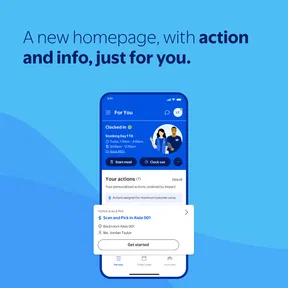
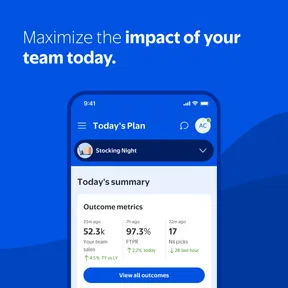
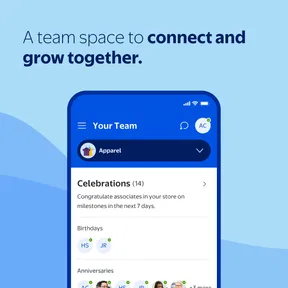
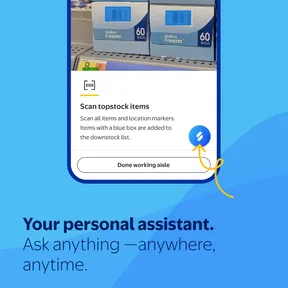

Our Review of MyWalmart
 Analysis by Appyee
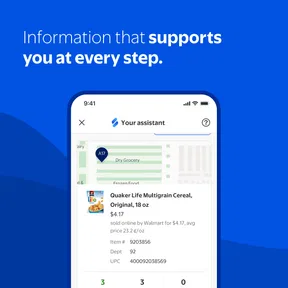
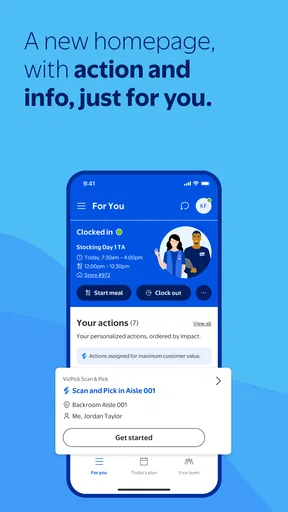
MyWalmart is a workplace app from Walmart designed for associates working in stores. I approached it less like a general shopping tool and more like a practical work companion: its value depends on whether you are a Walmart store associate who needs access to the company’s internal mobile experience. For that audience, the app has a clear purpose. For everyone else, it is unlikely to offer a useful reason to install it.
That distinction matters for trust. I am much more comfortable judging an app when its intended audience is obvious, because I can separate the permissions and account choices that make sense for work from those that would feel unnecessary in a consumer app. MyWalmart is free, carries an Everyone age rating, and is developed by Walmart. It sits in the business category rather than trying to present itself as a general productivity suite for every kind of user.
The app has built a substantial presence on mobile, with more than a million installs, an average rating of 4.5 from roughly 245,000 ratings, and about 17,000 written reviews. Those figures suggest that many associates find it useful enough to keep installed, although popularity alone does not prove that every part of the experience is smooth or that every user will feel equally comfortable with its account and data expectations.
What MyWalmart is really for
The first thing I would tell a friend is not to confuse this app with Walmart’s customer-facing shopping tools. MyWalmart is intended for associates in stores, so the relevant question is not whether it can help you compare products or place an order. The relevant question is whether it gives you a convenient mobile route into work-related information and routines that would otherwise require another channel.
That focus gives the app an advantage over ordinary note-taking, calendar, or messaging apps. A generic tool can remind you about a shift or hold personal notes, but it does not belong to the same workplace environment. Using a separate calendar may help you remember a time, yet it can leave you checking several places for changes or context. MyWalmart is more appropriate when the information you need is tied to your role as a Walmart associate rather than to your private life.
At the same time, I would not install it expecting a complete replacement for every workplace conversation or every official process. An app can make access more convenient without becoming the sole source of truth for a store. If a matter affects pay, attendance, scheduling, safety, or a formal employment decision, I would still read the relevant instructions carefully and use the official route required by the workplace. Convenience should not encourage anyone to treat a phone screen as proof that a sensitive issue has been resolved.
Trust starts with the right account expectations
Because this is a business app for associates, the account experience is central to the review. A work-focused app naturally needs to distinguish an associate from an ordinary member of the public, and that means users should approach sign-in with the expectation that the app is connected to an employment context. I would use the account intended for work rather than trying to improvise with a personal profile or sharing credentials with another person.
That is not just a basic security habit. Shared access can blur who viewed information, who changed a setting, or who acted on a prompt. If the app is used on a family tablet or a device that other people regularly handle, I would be especially careful about leaving the session open. The safest routine is to use a personal device where possible, lock the device itself, and sign out or otherwise secure the app when the phone is passed to someone else.
MyWalmart is not the right choice for someone who wants an anonymous workplace reference tool. Its usefulness comes from being connected to the associate experience, so a user should think about the relationship between access and identity before installing it. That may sound obvious, but it is an important difference between this app and a public business-news or shopping app.
Visible choices are more important than convenience alone
When I review an app with a workplace connection, I look for moments where the user can pause and make a deliberate choice. The practical controls are not limited to a single settings screen. They include deciding whether to keep the app on a personal phone, whether to allow notifications, whether to review account details before acting, and whether to use a shared device at all.
Notifications deserve particular attention. A work alert can be helpful when it prevents a missed update, but it can also reveal that the user is an associate to anyone who sees the lock screen. I would keep notifications enabled only if they genuinely support my routine, then check the phone’s system settings to limit what appears before unlocking. A discreet notification is often a better compromise than either allowing every detail to appear publicly or disabling all alerts without considering what might be missed.
I would also avoid treating an in-app prompt as something to accept automatically. When an app asks for access or presents an account action, I prefer to read the wording, consider whether it fits the task I am doing, and choose the narrowest option that still lets me work. That habit is especially useful on a personal device, where workplace information and private information share the same operating system.
Handling sensitive moments on a personal phone
The most sensitive moments are not necessarily dramatic. They can be ordinary situations such as checking a work update while standing beside friends, opening the app on a family device, or receiving a notification during a break. A screen can expose more context than the user intended, even when the app itself is functioning normally.
My practical approach would be to check the phone’s lock-screen notification controls before relying on the app every day. I would also review which account is active, especially after changing devices or helping with a setup. If the phone has a work profile, device-management setting, or separate user space, I would follow the device’s own guidance rather than assuming that the app automatically separates work material from personal material.
Another useful habit is to avoid saving screenshots of work information in a personal photo library unless there is a clear reason. Screenshots can be backed up, searched, or shown in unexpected places. If I need to remember a task, I would first consider whether the app already provides a safer way to return to it. If I do capture something temporarily, I would remove it when it is no longer needed.
I would apply the same caution to links, codes, or requests that arrive unexpectedly. A familiar company name does not make every message safe by default. If a prompt asks for unusual credentials or directs me away from the normal account path, I would stop and verify it through a trusted workplace channel. This is not an accusation against MyWalmart; it is a sensible boundary whenever a work account is used on a mobile device.
Where the app is stronger than ordinary alternatives
The clearest strength is context. A general calendar can store a shift time, and a notes app can hold a reminder, but neither is designed around the needs of Walmart store associates. MyWalmart is the more natural option when the task depends on being recognized as part of that workplace environment.
It also reduces the temptation to build a fragile personal system from unrelated tools. In my experience, separate reminders, screenshots, messages, and handwritten notes quickly become difficult to maintain. An official associate app can give the user a more direct starting point, which is valuable when the goal is to check work information rather than organize a whole personal productivity system.
That does not mean it beats every alternative. A calendar remains better for combining work with appointments, school, childcare, or travel. A notes app is better for private planning that should not be mixed with employment information. A direct conversation with a supervisor or the appropriate workplace contact is better for clarification when an app screen is ambiguous. The best setup may be a combination: use MyWalmart for its workplace context and a personal tool for broader life planning, without copying sensitive details unnecessarily.
A realistic day-to-day example
Imagine an associate checking the app before leaving home, then receiving a work-related notification during the day. The useful workflow is simple: unlock the phone privately, confirm the account context, read the update carefully, and avoid making assumptions based on a short notification preview. If the update affects a planned appointment, the associate can then decide whether a separate personal calendar needs changing.
The trust issue appears in the small details. If the phone is on a kitchen counter, the notification preview may be visible to other people. If the associate uses a shared tablet, the previous session may still be accessible. If a screenshot is taken for convenience, it may remain in automatic backups. None of these problems requires the app to malfunction. They come from the way workplace information travels through a personal device.
My recommendation in that situation would be to set up the phone deliberately before depending on the app: protect the device with a passcode, control lock-screen previews, keep the account private, and review the app’s access choices when the operating system presents them. Those steps give the user more control without making the app harder to use than necessary.
What the ratings tell me—and what they do not
The 4.5 average and large volume of user feedback make MyWalmart look established rather than experimental. I see that as a positive sign for an associate deciding whether the app is worth trying. A million-plus installs also indicate that the intended audience is large enough for the app to be a familiar part of many store employees’ mobile routines.
Still, a rating is a summary, not a guarantee. Business apps are often judged during stressful moments: a user may be trying to find an important update quickly, sign in after a device change, or understand a workplace instruction. A polished appearance matters less if the account path is confusing at the moment it is needed. I would therefore pay attention to recent feedback in the app store and to how the app behaves on my own device, rather than assuming the average reflects every situation.
The current version is 2.13.1, and the app supports devices running iOS 9 or later. That broad compatibility can help associates using older Apple hardware, but older operating systems deserve extra care from a security perspective. I would keep the phone and its security updates current whenever the device supports them, and I would avoid using an outdated device for sensitive work access if it no longer receives dependable system updates.
Who should use it and who should skip it
I would recommend MyWalmart to a Walmart store associate who wants a direct mobile connection to the company’s associate experience and is willing to manage the account as work-related access. It makes the most sense for someone who checks workplace information away from a desk and wants fewer disconnected personal reminders.
I would skip it if I am simply a Walmart customer looking for shopping features. The app’s store summary makes its audience clear: it is available for associates in stores. Installing it as a shopper would create the wrong expectation and could lead to unnecessary account or notification friction.
I would also think twice if I strongly prefer to keep employment information off a personal phone. In that case, a workplace-approved device or another official access method may be a better fit, if one is available. The trade-off is straightforward: mobile convenience comes with responsibility for the phone, account, notifications, and any information visible around them.
My cautious verdict
After looking at MyWalmart through the lens of trust and user control, I see a focused business app rather than a general-purpose tool. Walmart is the developer, the price is free, and the Everyone rating makes it accessible from an age-classification standpoint, but those facts do not remove the need for sensible account habits. The app is most valuable when used by the people it was built for and when its workplace role is kept separate from casual personal use.
The strongest reason to use MyWalmart is direct workplace context, not a promise that it replaces every other tool. I would install it if I were a store associate, set up notifications carefully, protect the account, and avoid treating previews or screenshots as harmless by default. I would use a calendar for my wider schedule, private notes for personal planning, and a human workplace contact whenever the app leaves an important question unclear.
My final view is positive but measured. The app appears useful for its intended audience, has a strong average rating, and is free to try. Its main limitation is not that it lacks a consumer-friendly purpose; it is that users must understand the boundaries of a work app on a personal device. If you are a Walmart store associate and value convenient access, MyWalmart is worth considering. If you are not, there is little reason to give it space on your phone.
Privacy and Permissions
See what permissions an app requests and how it handles your data.
- Location
- approximate location (network-based), precise location (GPS and network-based)
- Phone
- directly call phone numbers, read phone status and identity
- Photos/Media/Files
- read the contents of your USB storage, modify or delete the contents of your USB storage
- Storage
- read the contents of your USB storage, modify or delete the contents of your USB storage
- Camera
- take pictures and videos
- Microphone
- record audio
- Wi-Fi connection information
- view Wi-Fi connections
- Device ID & call information
- read phone status and identity
- Other
- view network connections, pair with Bluetooth devices, access Bluetooth settings, change network connectivity, connect and disconnect from Wi-Fi, expand/collapse status bar, full network access, change your audio settings, control Near Field Communication, run at startup, reorder running apps, draw over other apps, control vibration, prevent device from sleeping, read Google service configuration
Verdict
Strengths of MyWalmart
- Conveniently combines shopping, pharmacy, grocery, and account tools in one app.
- Store maps can help locate products and reduce time spent searching in larger stores.
- Supports Walmart+ features, including member benefits and delivery-related services.
- Digital receipts make it easier to track purchases and simplify returns.
- Prescription refills and pharmacy information are accessible from your phone.
Limitations of MyWalmart
- Some features vary by store, location, membership status, or product availability.
- The app may request several permissions and collect considerable shopping data.
- Search results can include marketplace sellers alongside Walmart inventory.
- Delivery fees, substitutions, and time slots may differ during checkout.
- Performance can feel slower when loading large product lists or account pages.
Other Releases by Walmart
View All
Walmart: Shopping & Savings
Shopping4.7

Spark Driver
Business4.0
Similar Picks in This Category
View All
LinkedIn: Community & Network
LinkedIn3.8

Zoom Workplace
zoom.com4.1

Microsoft Teams
Microsoft Corporation4.6

Meta Business Suite
Meta Platforms, Inc.4.6

Webex Meetings
Cisco Systems, Inc.4.5

TeamViewer Remote Control
TeamViewer4.4
Frequently Asked Questions
What is MyWalmart, and who can use it?
MyWalmart is Walmart’s employee-focused mobile application, designed to give associates convenient access to workplace information and tools. Depending on your role, location, and the current version of the app, it may provide schedules, company news, benefits information, learning resources, internal communication, and other work-related services. It is generally intended for Walmart associates rather than regular shoppers, so access usually requires valid employee credentials.
How do I sign in to MyWalmart?
To sign in, you typically need to use the credentials connected to your Walmart associate account. The exact login process can vary by country, department, and security requirements, and some users may be asked to complete additional verification. If your password does not work or your account is locked, use the official recovery options or contact your store manager, personnel office, or Walmart support instead of downloading unofficial versions of the application.
What features are available in the MyWalmart app?
MyWalmart’s available features can differ according to your employment status, role, region, and app version. Common tools may include viewing work schedules, checking company announcements, accessing benefits or pay-related information, completing training, finding workplace resources, and reviewing associate communications. Some functions may open a browser or another official Walmart service, so not every feature is necessarily handled directly within the app.
Is MyWalmart free to download and use?
The official MyWalmart application is generally free to download, and eligible associates normally do not pay a subscription fee to access its workplace features. However, using the app requires an internet or mobile-data connection, and your carrier may apply data charges. Availability can also depend on your employment account and Walmart’s internal systems, so installing the app alone does not guarantee access to every feature.
Is MyWalmart safe, and what should I do if it does not work?
For safety, download MyWalmart only from the official Google Play Store or Apple App Store and check that the publisher is Walmart or the authorized Walmart entity for your region. Avoid modified APK files and websites requesting your associate password. If the app crashes, shows outdated information, or refuses to sign in, update it, restart your device, check your connection, and contact official Walmart support if the issue continues.
